Browse public templates
Search by category, tag, shortcut, author, or install count before adding anything to your local app.
Phrase expansion for doctors
DocPhrase turns shortcuts like .sig, plan, and analgesia into reusable text for patient
plans, signatures, addresses, and common documentation across EHRs, Gmail, Word, Chrome, Safari, Notes,
Mail, and support tools.
After your colonoscopy, sedation was given during the procedure...
.cscope #clinicalBest regards, Your Name, DocPhrase
.sig #email.cscope
You had a colonoscopy today. Please follow these instructions and call your care team if symptoms worsen.
.cscope.cscopeprepSee it work
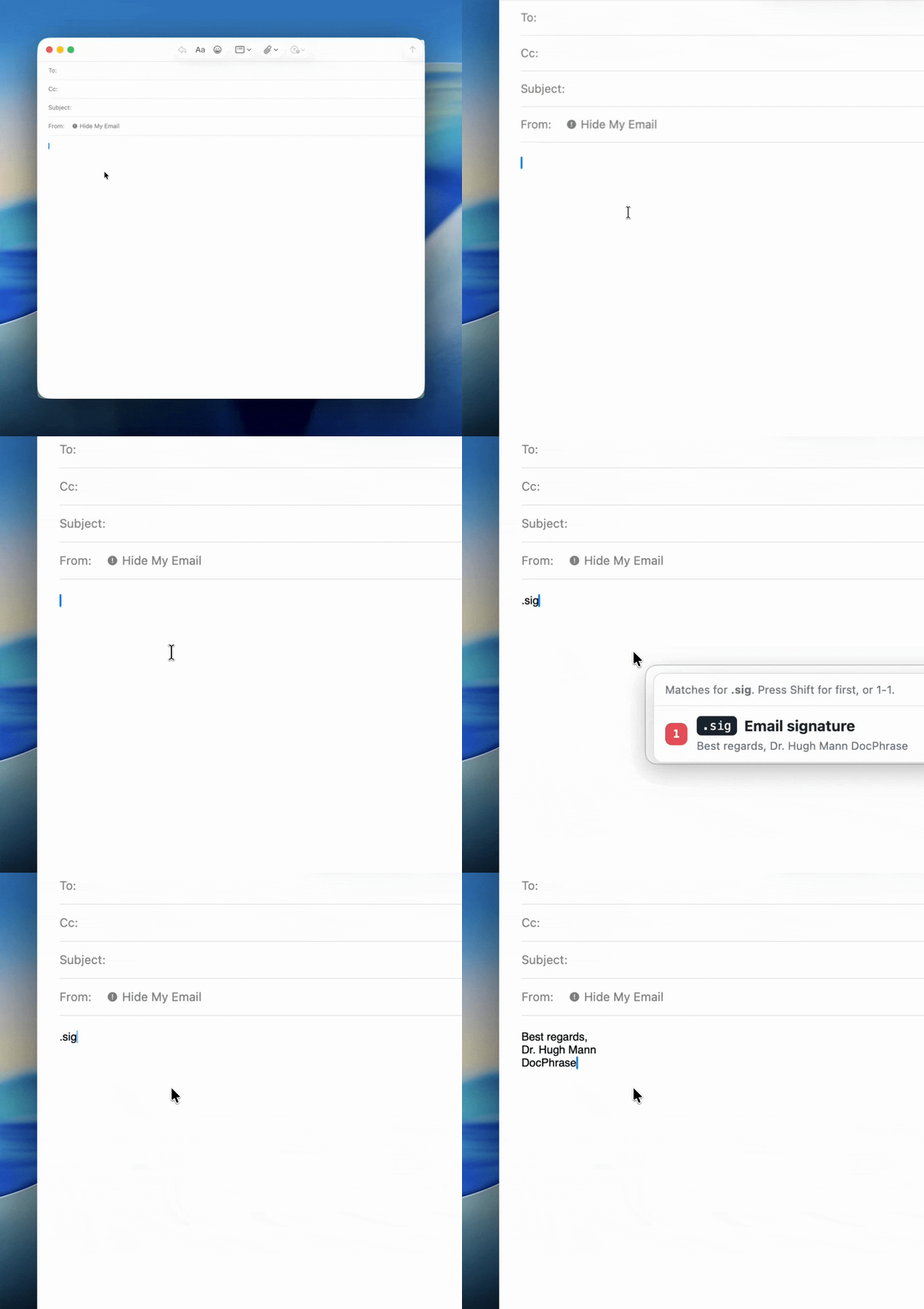
Use DocPhrase for signatures, addresses, patient instructions, return precautions, and plans you type again and again.
Template marketplace
Search by category, tag, shortcut, author, or install count before adding anything to your local app.
Template detail pages include Copy and Add to DocPhrase actions using a stable import schema.
Submit templates with fillable placeholder metadata so other users can recreate the same popup forms.
Why use it
Type a shortcut and pick the right phrase inline without breaking your writing flow.
Turn placeholders into quick popup forms for names, dates, picklists, yes/no fields, sliders, and more.
Keep reusable text organized by role, department, workflow, or subject.
When multiple phrases match what you typed, choose one with number keys instead of hunting through menus.
Your snippets stay local by default, with no account required for the desktop app.
Designed as a tray app for keyboard-first work, not another browser tab to babysit.
How it works
Add a title, shortcut, tags, and optional fillable fields.
DocPhrase watches for matching shortcut text as you write.
Press Shift for the first match or a number key for another match, fill fields if needed, and paste.
Pricing
$0
For testing DocPhrase on one Apple Silicon Mac.
$3/user/month
For unlimited local templates without cloud storage.
$8/user/month
For doctors who want unlimited templates plus cloud template storage.
Best value
$80/user/year
Two months free for daily documentation workflows.
Compare plans
| Feature | Free | Local Monthly | Pro Monthly | Pro Annual |
|---|---|---|---|---|
| Template limit | 10 templates | Unlimited local templates | Unlimited | Unlimited |
| Local phrase expansion | Included | Included | Included | Included |
| Folders and tags | Included | Included | Included | Included |
| Fillable fields | Basic fields | Basic fields | Advanced fields | Advanced fields |
| Multiple inline matches | Included | Included | Included | Included |
| Cloud template storage | Locked | Not included | Included | Included |
| Updates and support | Community support | Standard updates | Priority updates | Priority updates |
| Billing | No subscription | $3 per user monthly | $8 per user monthly | $80 per user yearly |
| Best fit | Trying DocPhrase | Unlimited local use | Cloud-backed template workflows | Daily documentation work |
Download
The Apple Silicon beta is being prepared as a signed and notarized macOS installer. Intel Mac and Windows builds will be added after packaging and testing are ready.
Current build: DocPhrase 0.1.0 for macOS arm64. Public download resumes after notarization.
Version log
v0.1.0 · Jun 14, 2026 · Apple Silicon beta
Packaged the local-first phrase expander as a macOS Apple Silicon installer.
v0.0.9 · Jun 14, 2026
Added monthly and annual Pro checkout, plan comparison, and clearer public pricing.
v0.0.8 · Jun 14, 2026
Added subscription-aware checkout APIs and locked future cloud sync behind Pro entitlement checks.
v0.0.7 · Jun 14, 2026
Generated app, dock, and tray icons, then prepared macOS installer packaging with EULA support.
v0.0.6 · Jun 14, 2026
Polished the desktop editor and added typed fields such as text, yes/no, picklist, slider, date, and number.